
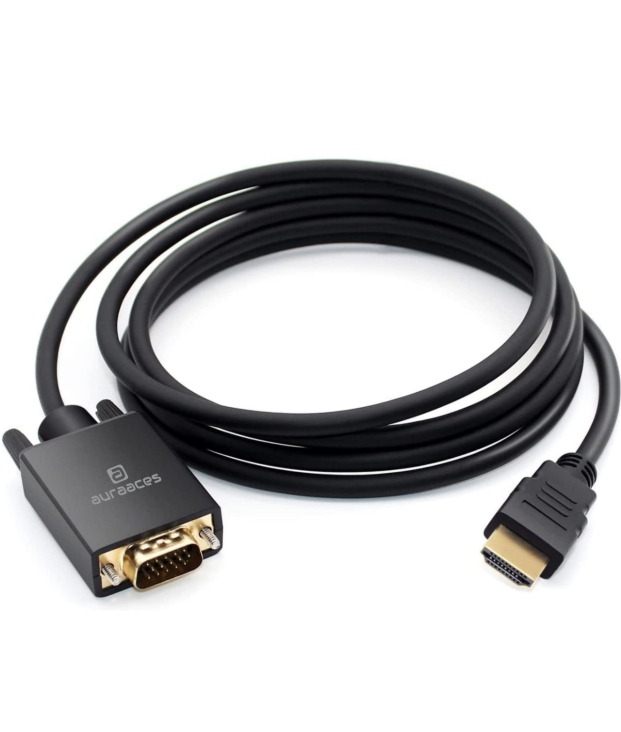
AURAACES HDMI TO VGA CABLE 1.8M

HDMI-to-VGA cable like AURAACES HDMI TO VGA CABLE 1.8M is supposed to do — and what you should check to make sure it works as expected. Based on common specs for HDMI→VGA cables / adapters on the market.
HDMI-to-VGA cable like AURAACES HDMI TO VGA CABLE 1.8M is supposed to do — and what you should check to make sure it works as expected. Based on common specs for HDMI→VGA cables / adapters on the market.
📺 What this cable does
-
Converts HDMI (digital) → VGA (analog): It lets you connect a device outputting HDMI (like a laptop, PC, media player, etc.) to an older display — monitor, projector or TV — that only has a VGA input. UNITEK+1
-
Supports Full HD video (up to ~1080p): Many HDMI→VGA cables support up to 1920×1080 at 60 Hz (Full HD resolution) — enough for standard monitors and projectors. GetUSCart+2Shift Tech BD+2
-
Cable length ~1.8 meters (6 ft): That length gives flexibility in setup — useful if your input device (laptop/PC) and display are not close by. GetUSCart+1
-
“Plug-and-play” — no drivers/software needed: Most of these cables work simply by plugging them in; the conversion from HDMI to VGA is handled internally by an active chip in the cable, so no extra software is needed. Evo Store+1
⚠️ Important limitations & what to check
-
Only works one-way: HDMI → VGA. It will not work in reverse (VGA → HDMI). If you plug a VGA-output source into HDMI input expecting it to convert, it won’t work. ramdeventerprises.in+1
-
Likely no audio over VGA: VGA is video-only (analog video). If you need sound, you’ll probably need a separate audio connection (unless the cable/adapter explicitly provides audio output). GetUSCart+1
-
Source must output HDMI (digital): The device (PC, laptop, media box, etc.) must have a working HDMI output. Older devices with only VGA (or other analog) output won’t benefit.
-
Quality matters: Because HDMI is digital and VGA analog, the cable/adapter must have the active converter chip inside. Cheap “passive” or ill-specified cables may simply not work. Reddit+1
✅ When this cable is useful
-
When you have a modern laptop/PC (HDMI output) and want to connect it to an older monitor or projector that only offers VGA input.
-
For office/home setups for simple video output — presentations, documents, standard video — especially on older monitors or projectors.
-
When you want a simple, low-cost solution without upgrading to a new monitor/display with HDMI.
If you want — I can pull up the full spec sheet (resolution, supported refresh-rates, supported input/output formats, any known incompatibilities) — for 3–4 popular HDMI→VGA 1.8 m cables (including yours) so you can compare.
















Add A Review
Your email address will not be published. Required fields are marked
Your Rating *
You need to Login OR Register